Hero Academy Architect:
Revision Homework Your Class Will Actually Want to Do
· @Mr Masters
Hero Academy Architect is a free strategy game that doubles as Year 8 Computer Science revision. Students build their own superhero academy, and every building runs on a real topic from their knowledge organiser: binary, hexadecimal, compression, encryption and image file size.
Revision homework has a reputation problem. Hand a class a worksheet of binary conversions and most will do the minimum, if they do it at all. The content is not the issue. The issue is that a worksheet gives students no reason to care about getting the next answer right.
So I built a game where every correct answer builds something. There is nothing to install, no account to create, and it runs in any browser. You can play it now at adammasters.com/KS3/Unit1-CS_Academy/Revision_Hero_Academy.html.
How it plays
A full game runs over five rounds and an inter-house championship, taking 20 to 25 minutes. A Quick Play mode cuts this to two rounds and the championship, in about 10 minutes, which suits a lesson starter.
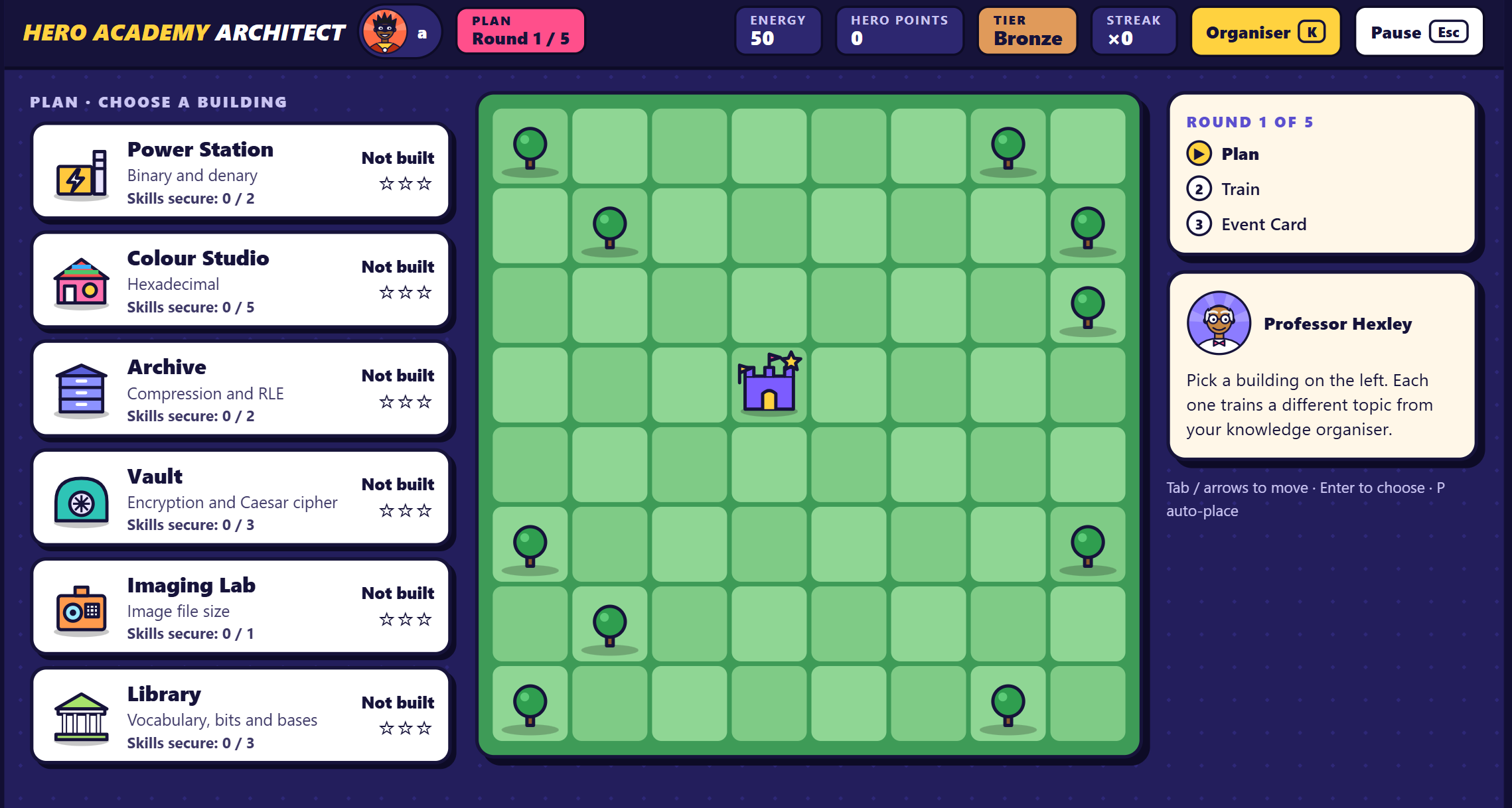
Professor Hexley, the academy’s mentor, walks students through a short tutorial. Then each round follows the same three steps:
- Plan. Choose a building and place it on the academy grid. Each building trains a different topic.
- Train. Answer questions on that topic to secure its skills. Correct answers earn hero points, build streaks and raise the building’s star rating.
- Event Card. A short story twist puts the topic to work in a new context, so students apply what they know rather than repeat it.
The game finishes with the inter-house championship. Students pick a house and compete for the cup, earning points for accuracy, streaks and sportsmanship. A summary screen then shows every skill, every question and its correct answer.
Six buildings, six topics
Every building on the academy grid maps to one section of the Year 8 data unit. Students can see at a glance which skills are secure and which still need work.
Building | Topic | Skills to secure | What students practise |
|---|---|---|---|
Power Station | Binary and denary | 2 | Flipping bit switches to hit a target value, converting both ways |
Colour Studio | Hexadecimal | 5 | Converting between hex, binary and denary, and reading #RRGGBB colour codes |
Archive | Compression and RLE | 2 | Lossy versus lossless, and encoding runs such as AAAABB as 4A 2B |
Vault | Encryption and Caesar cipher | 3 | Turning an on-screen Caesar wheel to encrypt and crack messages |
Imaging Lab | Image file size | 1 | Width × height × colour depth, then dividing by 8 for bytes |
Library | Vocabulary, bits and bases | 3 | Key terms, sorting and matching activities |
The Imaging Lab is slightly different. It opens with a short mini-lesson and a worked example, because image file size is taught inside the game rather than assumed.

Built for learning, not just fun
The game mechanics are there to keep students practising. Underneath them sit the habits that make revision work.
- Flashbacks. A question a student gets wrong comes back later in a different format. They have to recall the idea, not remember the answer.
- Hint ladder. Stuck students can reveal hints one step at a time, so they get just enough help to carry on.
- Exam conditions. Some questions switch hints off, mirroring the real assessment.
- A timer that never ends a question. The optional speed bonus adds points but never cuts a student off, so slower thinkers are not punished.
- Knowledge organiser on tap. Press K at any point to open the full organiser, with worked examples for every conversion.
- Sportsmanship moments. The championship rewards how students compete as well as how they score.
It is also built to be accessible. Everything works from the keyboard, it respects reduced-motion settings, and progress saves automatically in the browser. Students who switch laptops can copy a save code into OneNote or Teams and carry on elsewhere.
Where it sits on the SAMR model
Hero Academy Architect sits firmly at Modification, with some features reaching towards Redefinition. Ruben Puentedura’s SAMR model asks whether technology simply replaces an old task or genuinely transforms it. Comparing the game with a traditional revision worksheet shows where it lands.
SAMR level | What it would look like | Does the game do this? |
|---|---|---|
Substitution | The worksheet typed into a digital form | Goes well beyond |
Augmentation | Instant marking and feedback | Yes, on every question |
Modification | The task is redesigned: interactive bit switches and a Caesar wheel, hint ladders, and missed questions returning in new formats | Yes, this is its core |
Redefinition | Learning that was not possible without technology | Partly: adaptive flashbacks and a personalised end-of-game skills report |
The step to full Redefinition would come from connecting students to each other. A live class-wide house leaderboard, or students designing their own buildings and questions for others to play, would create tasks that simply could not exist on paper. Those would be natural next steps.
Getting started
The game works best in the week before the end-of-topic assessment. By the time students sit the test, they have already used every idea to build something.
- Students: play a full game, then open the Revise links on your summary screen for anything not yet secure.
- Teachers: set it as homework, or use Quick Play as a starter. Ask students to screenshot their summary so you can see which buildings are weakest across the class.
- Parents: it is free, needs no login and runs on any laptop, so it is easy to try together at home.
Play Hero Academy Architect now at adammasters.com/KS3/Unit1-CS_Academy/Revision_Hero_Academy.html.
